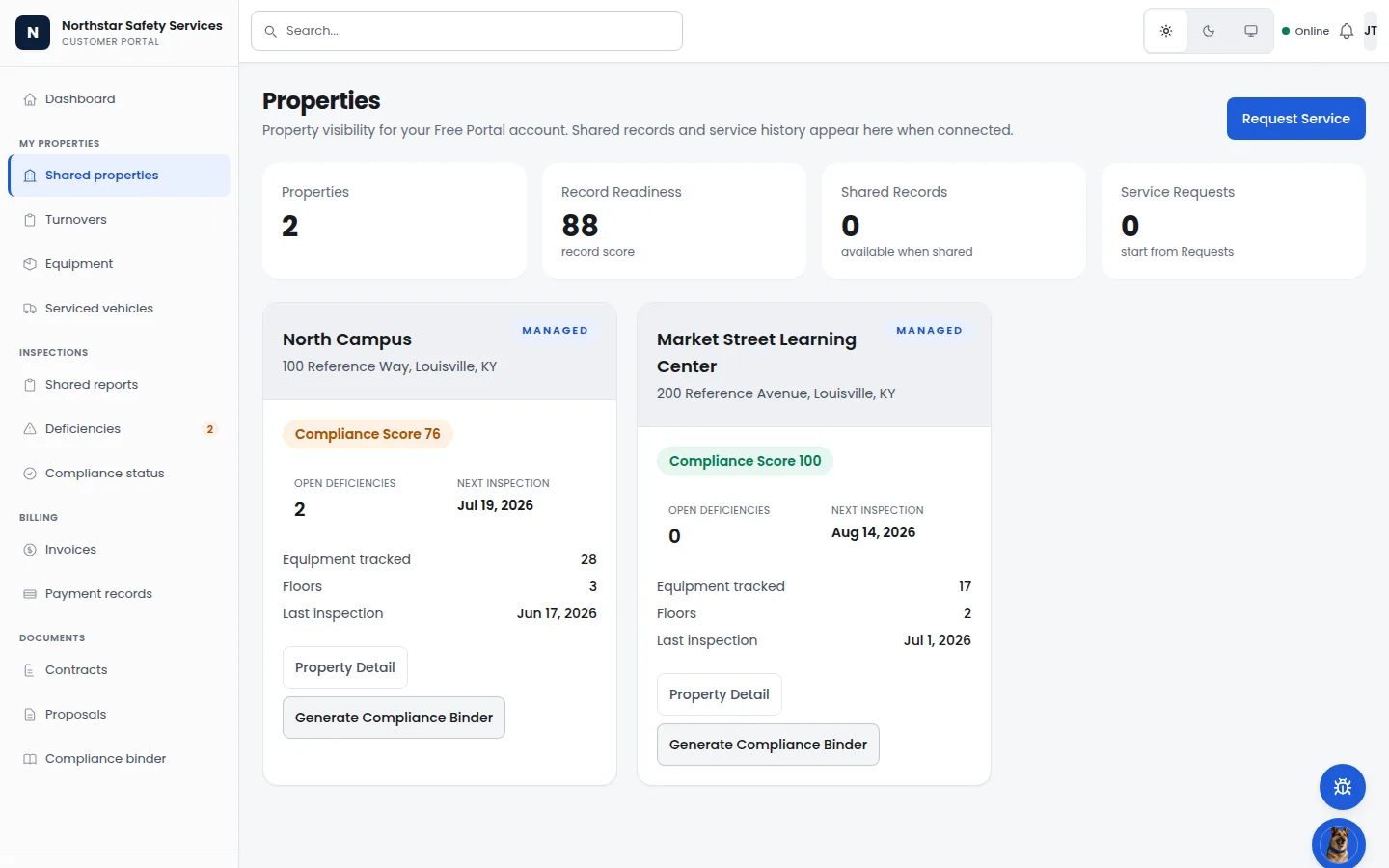
Building / facility record
Give authorized property users a scoped view of locations, readiness, equipment, deficiencies, and inspection dates.
Request an FM demoA tenant submits a request. It becomes a work order. It routes to the right vendor — whose COI is current — and the inspection that found a deficiency last quarter lives on the same building. One record across the people who own, manage, occupy, and service the property.
Product walkthrough
Facility teams can show the building record, maintenance trail, inspection history, deficiency status, and compliance context without rebuilding the story in a spreadsheet.
Building / facility record
Give authorized property users a scoped view of locations, readiness, equipment, deficiencies, and inspection dates.
Request an FM demo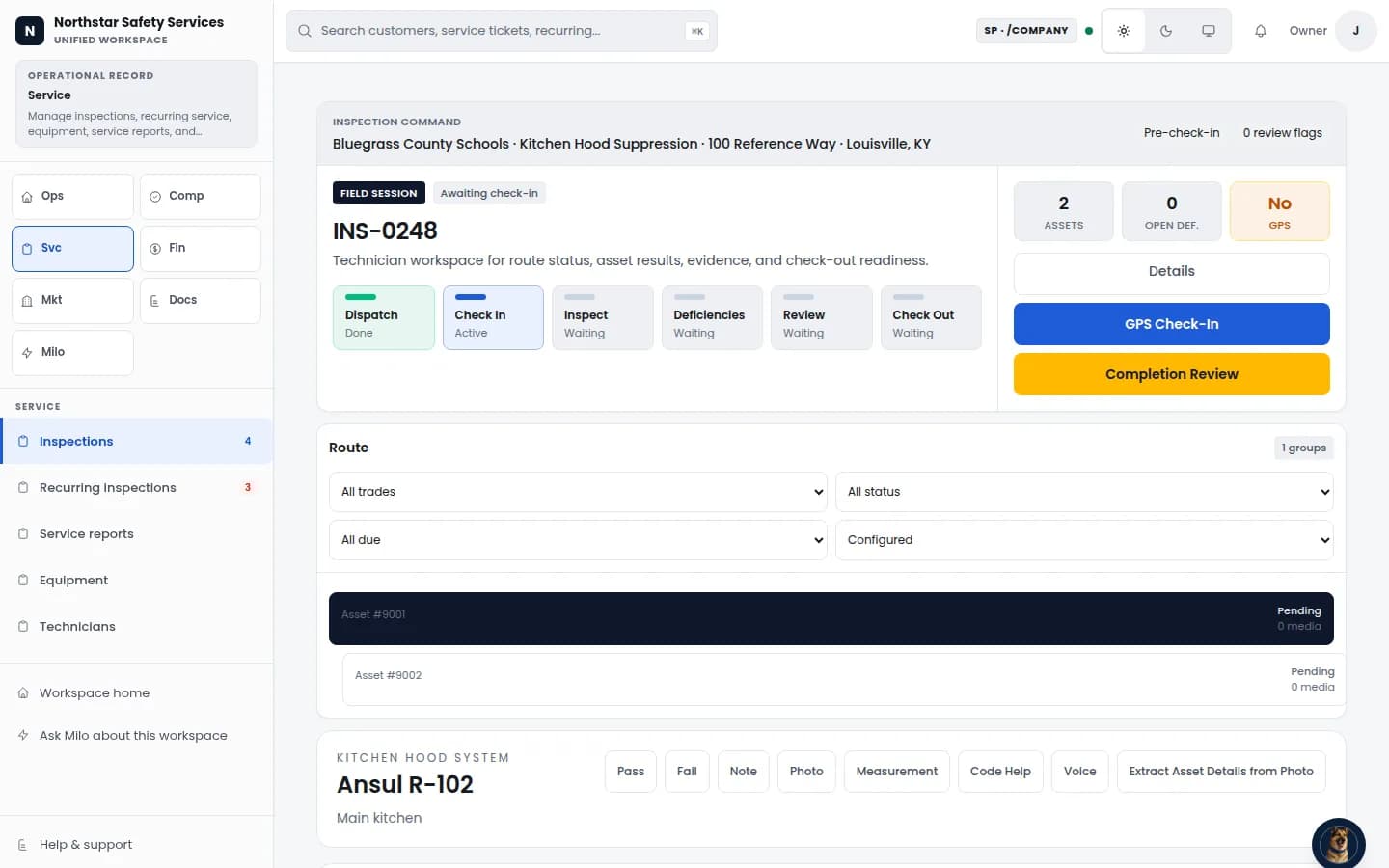
Compliance & Inspections
Run inspection stages, review flags, deficiencies, evidence, and completion from one workspace.
View Compliance & Inspections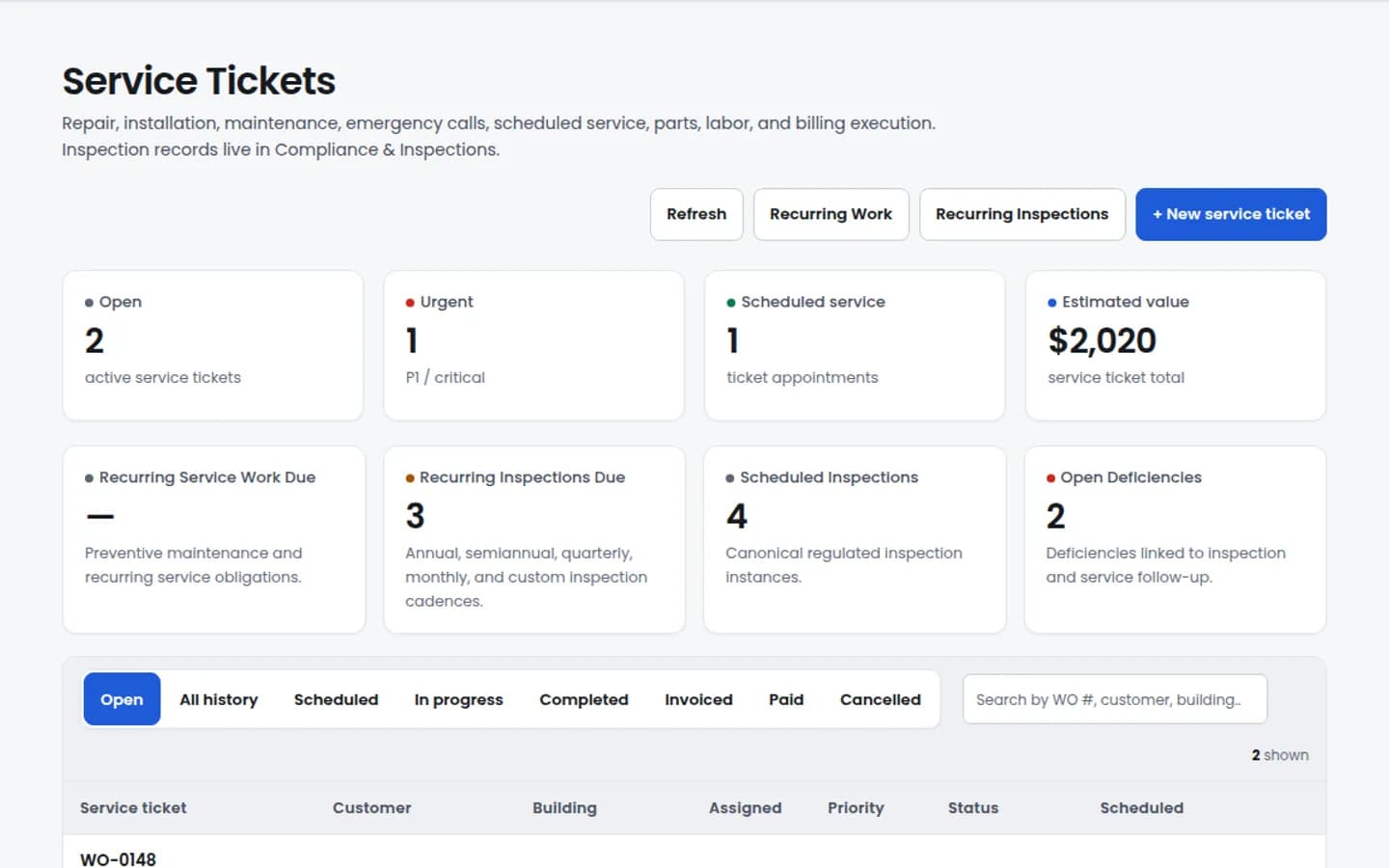
Service work
Track work requests, status, priority, and follow-up without losing inspection or site context.
View service workFrom request to proof
Facility teams can connect inspections, deficiencies, photos, vendor work, timestamps, approvals, and closeout history to the building record without rebuilding the story later.
Give authorized property users a scoped view of locations, readiness, equipment, deficiencies, and inspection dates.
FM is built around a building record that three different people read three different ways without anyone re-keying the data.
Property managers
You hold a portfolio of buildings, units, and tenants. You need a place where a maintenance request becomes a tracked work order, vendors carry current insurance, and you can answer the owner without rebuilding the timeline.
Facility directors
You run physical plant for one or many buildings. Annual fire-alarm, sprinkler, extinguisher, backflow — all live on the same building record as the work that fixes deficiencies. The proposal that closes the finding is one click from the inspection that found it.
Tenants
You rent a unit, you have a leak, and you do not want to call. The tenant portal lets you submit a request, see who is coming, and close the loop when it is fixed. Workflow maturity is honest — we have the scaffolding shipped and we are building out the depth.
Review available modules below and contact us to confirm the setup your team needs.
Property & Building Records
Available nowProperties, buildings, units, and tenants as first-class records. The building you read on the inspection is the same building the maintenance request lands on and the same building the vendor sees when dispatched. No parallel "facilities database" that drifts out of sync with the lease record.
Maintenance Requests → Work Orders
Available nowA tenant submits a request from the portal or a manager creates one directly. It becomes a work order on the same engine the Service suite runs. The work order routes to an internal team or an external vendor based on the building's preferred-vendor list. Status, photos, and notes attach to the building record — not a phone's camera roll.
Vendor Records & COI Tracking
Available nowVendor records carry contacts, trades, COI documents, and expiration dates. When a COI is about to lapse, the record flags it before a work order is dispatched against expired coverage. SLA tracking, NTE approvals, spend views, and scorecards now read from the same vendor and work-order data instead of a parallel rollup.
Building Inspection Scheduling
Available nowAnnual fire-alarm. Annual sprinkler. Quarterly extinguishers. Monthly walkthroughs. Schedule them on the building record using the same configured workflow library the Service suite uses. A pass/fail/deficiency outcome can spawn a work order on the same building without rekeying.
Tenant Portal
Available nowTenants can submit a request and see status. Deeper portal workflows are available in a private demo on request.
Asset & Equipment Records
Available nowBoilers, rooftop units, fire panels, generators, pumps — recorded on the building they serve. Service history, model and serial, install date, and warranty terms attach to the asset row. The inspection or work order that touches the asset writes back to the same record.
Multifamily Property Management
Available nowFor property management companies running real units: PMC → portfolio → property → building → floor plan → unit hierarchy, leasing lifecycle and resident ledger, Stripe Connect rent collection, state-compliant notice generation, native eSign on lease packets and notices, RPX importer, affordable / HUD agency submission, resident support portal, and make-ready tasks routed to work orders on the same building. The deep multifamily surface lives at /industries/multifamily.
NTE & Spend Controls
Available nowNot-To-Exceed thresholds, approval tiers, approval queue, approve/reject/escalate actions, and approval history are shipped. Spend analytics are also live across trade, vendor, location or building, and monthly time windows, with open commitments and budget variance visible from the financial dashboard.
Vendor Scorecards
Available nowVendor scorecards are live with stored monthly scores plus work-order metrics such as completion, average resolution, first-time-fix, SLA compliance, NTE compliance, callback/recall signals, and vendor performance exports. Because work orders, COIs, and invoices share one record, the scorecard reflects real activity, not a parallel rollup.
Visitor Management
Available nowFront-desk visitor check-in, badge or pass capture, checkout, guardian verification, ID verification, watch-list status, denied-visitor handling, active on-site counts, and presence reporting by school are shipped. Badge-printer hardware and on-prem access-panel integrations remain outside this claim.
Lease E-Sign
Available nowLease templates, addenda, and in-portal e-sign on the lease record. Live -- shipped as part of the multifamily document-packets work. Keep your current tool if you prefer it; we will not block, and the export trail is clean.
Broadcast Comms with Quiet Hours
Available nowProperty-wide notices, tenant-targeted notifications, and incident broadcasts with quiet-hours and consent enforcement -- live. The guardrails ship with the feature; quiet hours and consent are enforced before any send.
This is the path a maintenance request actually walks on Guspora today. Every handoff lives on the same building.
1. The tenant submits a request from the portal.
A unit reports a leak under the kitchen sink. The tenant opens the portal on their phone, picks the unit, picks the issue, attaches a photo, and submits. No email thread, no front-office call queue, no lost message. The request lands on the same building record the manager already lives in.
2. The request becomes a work order, routed by preferred vendor.
The building has a preferred-vendor list — plumber A is primary, plumber B is backup. The work order routes to plumber A based on trade and the building's rules. The dispatcher sees it queued; the tenant sees "assigned to plumber A" without anyone CC'ing anyone.
3. The vendor accepts, dispatches a tech, and confirms an arrival window.
Plumber A accepts on their portal. They schedule a technician, write back an arrival window, and the tenant gets the update on the same record they submitted on. No three-way phone tree.
4. COI is verified before the truck rolls.
The vendor record carries the current Certificate of Insurance with expiration dates. If the COI lapsed last week, the system flagged it before this work order ever dispatched. If it is current, the manager has a paper trail proving it — not a guess and a gut feeling.
5. Work is completed and signed off on the same record.
The technician closes the work order with a photo, a description, and a time stamp. The line items roll up to the work order; if there is a follow-up needed (a part on order, a scheduled return), it spawns a child work order on the same building record. Nothing is lost between visits.
6. The tenant closes the loop — or reopens it.
The tenant gets a "completed" notification. They can confirm and close, or flag it as not fixed and reopen against the same work order. The manager sees the close in their dashboard. If a deeper inspection is warranted (e.g., this is the third leak this quarter), it can be scheduled against the building from the same screen.
Most facility-management tools own a building record and a maintenance queue and stop there. The Service work — the annual inspections, the deficiency remediation, the licensed contractor doing the actual fix — happens in a parallel system the FM tool cannot see.
On Guspora, an annual fire-alarm inspection scheduled in FM uses the same configured workflow library and the same contractor network that the Service suite uses. One library. One record. One audit trail.
One inspection library across FM and Service
A facility director scheduling an annual fire-alarm inspection in FM is using the same configured workflow library the Service suite uses on the contractor side. Same form library. Same deficiency taxonomy. Same audit trail. If the inspection finds a deficiency, the proposal that fixes it can come from a Service Provider on the platform — no re-keying the building, the asset, or the finding.
One contractor network across FM and Service
The vendor that the FM building uses for fire-alarm work is the same vendor that exists on the Service side as a Service Provider. There is one contractor record, one COI record, one license record. A facility director and a service contractor reading the same row is the entire architectural premise.
One building record, one audit trail
Maintenance work orders, inspections, COIs, deficiencies, completed proposals, asset service history — all attach to the same building. When the owner asks "what happened on this property in Q2?" the answer is one query, not five exports stitched in a spreadsheet.
Guspora connects building owners, facility teams, service providers, vendors, and AHJs in one verified work record — from inspection finding to competing bids, dispatch, completion, invoice, and compliance proof. Open marketplace bidding is platform-vetting gated and feature-flag controlled, so we avoid claims about vendor density or instant national coverage.
Here is exactly where we are and where the current limits are.
Available now
Today
Guardrails
What stays limited
Vendor eligibility
Guspora supports private network, invite-only, hybrid, first-right-of-refusal, and open-marketplace RFQ modes. Open marketplace is disabled by default and requires platform-approved vendors with current compliance before invite, bid, or award. Vendor availability depends on your location and service needs.
Bidder Q&A is not yet a live route
The data model can carry questions and addenda, but a wired bidder/buyer Q&A surface is not in this build. We do not show fake "Ask question" actions; clarification stays on the scope or an external channel until the route ships.
Deficiency-backed and SP-to-SP RFQ creation are contained
Inspection-finding-backed and SP-to-SP RFQ creation are disabled in this build until verified source context is wired server-side. Teams can still create a manual RFQ with copied scope while we finish the source-attribution path.
RFQ NTE approvals are contained
Bids above your RFQ spending threshold require manual review before award and conversion.
First-right-of-refusal is source-dependent
The RFQ model can represent first-right-of-refusal, but automation requires a verified originating vendor. Without that source, teams handle it manually and emergency overrides require an audited reason that is captured to the audit log.
Marketplace fees are audit-only until payment is linked
Awards record a platform fee snapshot for audit. Payment status updates when a payment event is received. Use the facilities RFQ workflow to request and review bids.
Live ServiceChannel / Corrigo connectors
Use the native vendor network for RFQ, bid, award, and dispatch workflows. ServiceChannel and Corrigo connections require separate configuration and verification; continue using your existing system of record while connector setup is pending.
We are explicit about this because marketplace claims need proof. Guspora now has real vendor controls beyond a directory, and open-marketplace work stays behind platform vetting, tenant settings, and compliance checks.
FM is the building, work-order, vendor, and inspection record -- where the maintenance and inspection story lives. The deep multifamily surface (leasing, resident ledger, rent, notices, e-sign, agency submission) is shipped at /industries/multifamily; broader Yardi and AppFolio integrations are planned.
What FM coordinates
A separate building-maintenance-records tool
If today you keep work orders in one app and properties in another, FM consolidates them onto one building record.
A vendor COI binder (paper or shared drive)
COI documents and expiration dates live on the vendor record. The binder, the email reminders, and the spreadsheet of dates can retire.
Ad-hoc tenant requests by email or text
The tenant portal moves the email thread and the front-office text-message handoff. One place to submit, one place to track.
What you keep
Portfolio operations with rent and accounting context
Yardi, AppFolio, RealPage, Buildium — keep them. We do not run rent, late fees, lease accounting, or GL close. We integrate where it is useful; we do not replace.
Your access-control hardware
Badge printers, on-prem access-control panels, electric strike hardware — those stay with the vendor that runs them. We can record events and tie them to the building record; we do not run the panel.
Commercial lease accounting tools
CAM reconciliation, percentage rent, escalation schedules — purpose-built tools own that today. We do not.
FM is part of every Guspora tenant once enabled. The same building you read in FM is the building Service inspects and Finance bills against. One record, no duplicate data entry, no parallel systems drifting out of sync.
Looking for the Service side? See the Service suite.